
Hallmark+
Crown Media Holdings Inc.Entertainment
3.26.38K Reviews
- Version
- 8.107.2
- Installs
- 1.00M
- Age Rating
- Teen
Screenshots
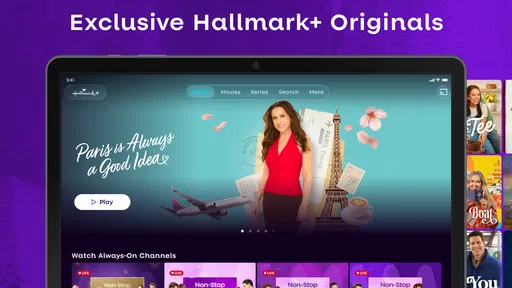
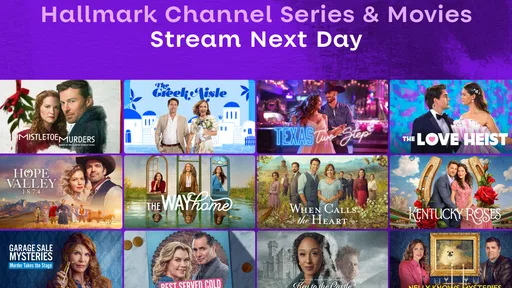


Our Review of Hallmark+
 Analysis by Appyee
I usually reach for Hallmark+ when I want something gentle and familiar rather than a show that demands all my attention. Its appeal is quite specific: this is an entertainment app centered on Hallmark-style movies, series, and a comforting mood. If that sounds like your kind of evening, it can be a welcome choice. If you want a broad mix of genres or a service built around the latest releases from many studios, I’d look elsewhere first.
When setup or playback feels like the hard part
Most streaming frustration happens before the story gets going: an account step, a title that is hard to locate, or playback that does not behave as expected. I’d treat those as separate problems rather than assuming the whole app is broken. First check that you are signed in to the account you meant to use, then return to the title and try again. If the issue appears only with one movie or episode, that points to a different problem than trouble across the entire app.
Hallmark+ is a free app to install, but that does not mean every viewing option is free. In-app purchases range from $3.99 to $79.99 per item, so I’d review the purchase details shown in the app before confirming anything. That distinction matters if you are installing it just to browse: check what access you have before planning a long watch session around a particular title.
A few checks before settling in
Before a planned movie night, I’d open the app while I still have time to sort out any account or connection hiccup. Confirm that the app is signed in, that your internet connection is working, and that the title you want is available to play. If you are watching on mobile data, consider whether streaming is a good fit for your plan; on a weak connection, waiting for a steadier signal is often less frustrating than repeatedly restarting playback.
The current version is 8.102.0 and the minimum Android requirement is 5.0. If the app will not install or open, checking whether your device meets that basic requirement is a sensible first step. Crown Media Holdings Inc. develops the app, and its long-running presence in entertainment is reflected in a product aimed at viewers who already know the Hallmark tone. It is rated Teen, so I would not treat the brand’s gentle reputation as a substitute for checking whether a particular program suits the people watching with you.
Recovering a viewing plan without extra hassle
When a title will not start, I prefer a small, orderly reset rather than tapping every control at once. I check the connection, close and reopen the app, and try the title again. If browsing still works but playback does not, I move to another available program briefly; that helps me tell whether the trouble is limited to one item or affects viewing more generally. If the whole app is unresponsive, restarting the device is a reasonable next general step.
A useful habit is to keep a second choice in mind instead of letting one failed search derail the evening. The collection leans into a recognizable style, so choosing a different romance or seasonal movie can preserve the mood even when the exact title you wanted is difficult to find. I also would not assume that a saved title or past recommendation guarantees it will be ready to play whenever you return; check the current screen before making plans around it.
Knowing when the app may not be the cause
Streaming depends on more than the app itself. If other online services are also struggling, your connection or the device may be the more useful place to investigate. If everything else works and just one title is affected, try another program before changing account settings. That simple comparison can save time and prevent needless changes that make it harder to get back to watching.
Hallmark+ is for viewers who value a consistent, cozy tone more than a huge cross-genre catalogue. A general streaming service may suit you better if your household wants documentaries, crime dramas, children’s animation, and new releases all in one place. I see this app as a focused option to add when Hallmark content is the reason you are opening a streaming app, not necessarily as a replacement for every other service you use.
Hey there, fellow app enthusiasts! So, I recently took a deep dive into the world of Hallmark+, and I’m here to share my experience. If you’re like me and love a good sappy movie or need a bit of holiday magic all year round, you might find this app interesting. Let’s break it down.
Getting Started with Hallmark+
First things first, downloading Hallmark+ is pretty straightforward. It’s available on both Android and iOS, so no one’s left out. Once you’ve got it installed, the sign-up process is smooth sailing. You can either create a new account or link your existing cable provider if you have one. I went the account route, and it was quick and painless.
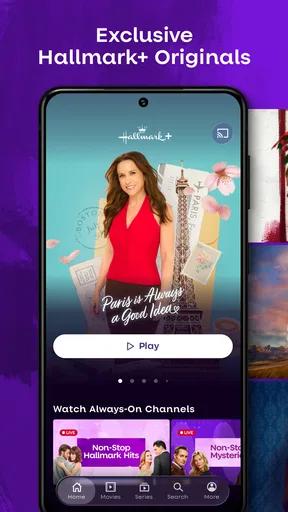
The interface is user-friendly, which is always a plus in my book. You’re greeted with a homepage that’s bursting with bright, cheerful thumbnails of movies and series. It’s like walking into a digital wonderland of feel-good content. The navigation bar at the bottom makes it easy to switch between movies, series, and live TV.
Content Galore
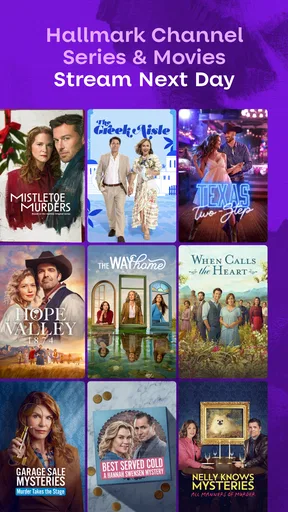
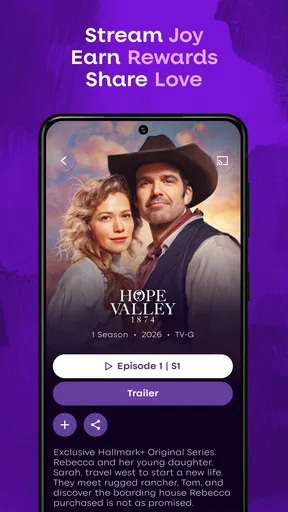
Alright, let’s talk content. This app is like a treasure chest for anyone who’s a fan of Hallmark’s signature style. There’s a hefty collection of romantic comedies, holiday classics, and even some original series you won’t find anywhere else. And yes, they have a Christmas movie section that’s available all year round. It’s never too early to get into the holiday spirit, right?
One feature I found pretty handy is the “Watchlist.” You can save movies and series you want to catch later. I’ve already got a queue that could last me months! Plus, the app recommends titles based on what you’ve watched, which is a nice touch if you’re indecisive like me.
Streaming Quality and Accessibility
Streaming quality is crucial, and I was pleasantly surprised by how well Hallmark+ performs. The videos load quickly, and I didn’t experience any buffering, even during peak times. The app supports HD streaming, so those scenic Christmas village shots look crisp and inviting.
If you’re someone who likes to watch on the go, you’ll appreciate the offline viewing feature. You can download movies and watch them later without an internet connection. It’s perfect for long flights or when you’re stuck in places with spotty Wi-Fi.
Family-Friendly Features
Hallmark has always been about wholesome entertainment, and Hallmark+ keeps that tradition alive. The app is pretty family-friendly, so you can let the kids explore without worrying about inappropriate content. There’s even a dedicated section for family movies, which is a nice touch if you’re planning a movie night with the kiddos.
Plus, for those who need it, the app offers closed captions in multiple languages. It’s a thoughtful feature that ensures everyone can enjoy the content, regardless of their hearing abilities.
Room for Improvement
No app is perfect, and Hallmark+ is no exception. While the content library is vast, I did notice that some of the older titles are missing. It would be great to see a more extensive back catalog, especially for longtime fans who want to revisit classic Hallmark moments.
Also, while the app is generally intuitive, I think the search function could be a bit more robust. Sometimes it took a couple of tries to find exactly what I was looking for, especially if the title was a bit obscure.
What the audience figures tell me
The app has a 3.3 average from around 14,000 ratings, alongside roughly 6,300 written reviews. Those figures suggest a mixed experience rather than a universally smooth one. I would read that as a reason to set sensible expectations: the service’s appeal depends heavily on whether its particular catalogue suits you, while everyday factors such as device compatibility and reliable playback matter too.
It has passed one million installs, which shows that plenty of viewers have tried it, but popularity alone does not tell me whether it fits a specific household. The app is free to download, and its Teen age rating is another useful point to keep in mind when deciding who will browse it. I’d still choose a title together if younger viewers are watching, rather than relying on the overall rating to judge every program.
A practical way to use the catalogue
For a low-effort evening, I’d use the app’s recommendations as a starting point, not as the final decision. If one suggestion looks right, save it to the Watchlist so it is easier to return to later. If you are choosing something with another person, browsing the movie and series sections together can be quicker than typing an exact title into search, especially when neither of you remembers the name clearly.
That approach also makes the app useful for a particular kind of shared viewing: a family visit, a quiet night after work, or a seasonal movie gathering where nobody wants a tense plot. It is less suited to a group with sharply different tastes. In that case, a broader streaming catalogue or a service with more varied genres gives everyone a better chance of finding something they want.
If you are planning to watch while travelling, prepare before leaving rather than waiting until you are offline. The app’s offline viewing option can help, but I’d confirm that the title is downloaded and ready while I still have a connection. That small check is more dependable than assuming a saved item in a Watchlist is the same as an offline copy; a Watchlist helps you remember what to watch, while an actual download is what you need for viewing without internet access.
What to expect from the viewing experience
The strongest reason to choose Hallmark+ is its focused mood. I would open it when I already know I want an affectionate romance, a holiday story, or a gentle series, rather than when I am in the mood to explore every kind of television. Compared with general-purpose streaming apps, it trades breadth for a more recognizable programming identity. That can make picking something feel easier, but it can also mean the catalogue feels narrow if you watch across many genres.
Its interface can help with casual browsing, but a familiar layout does not make every search effortless. When a title is not turning up, I’d try a simpler search term or browse the relevant section instead of repeating the same query. The Watchlist is particularly useful for this: if you spot a title while browsing, save it then, rather than expecting to remember its exact wording the next time you open the app.
One practical trade-off is that recommendations become more useful when your viewing habits align with the service’s core style. If you only open the app occasionally, browsing by mood or category may be more reliable than waiting for personalized suggestions to understand what you want. I would also keep expectations realistic about the back catalogue: the app offers plenty for fans, but it is not a guarantee that every older favorite will be there when nostalgia strikes.
Who I’d recommend it to
I’d recommend this entertainment app to Hallmark regulars, viewers who like familiar romantic stories, and anyone who wants a dedicated place for seasonal comfort viewing. It can also work well as a secondary app: keep it for the nights when its tone is exactly what you want, and use a broader service for everything else. The developer is Crown Media Holdings Inc., and the app’s focus is clear enough that a fan can quickly decide whether it belongs in their routine.
I would skip it if your main goal is a wide-ranging library, if you rarely enjoy Hallmark’s style, or if you expect every older movie to be available. It is also not my first choice when I want an unpredictable thriller, a deep documentary selection, or one subscription-style destination for a household with very different tastes. Those are not flaws so much as the limits of a focused service; they matter only if they conflict with what you want to watch.
My practical verdict
Overall, I’d say Hallmark+ is a solid choice for anyone who loves Hallmark’s brand of entertainment. It’s easy to use, packed with heartwarming content, and offers some nifty features like offline viewing. While there’s room for improvement, particularly in expanding the library and enhancing the search tool, it’s clear that Hallmark has put a lot of love into this app.
If you’re in the mood for romance, holiday cheer, or just need a little pick-me-up, give Hallmark+ a whirl. It might just become your go-to app for all things cozy and heartwarming. Happy streaming!
Verdict
Strengths of Hallmark+
- Extensive library of holiday movies.
- User-friendly interface and navigation.
- Ad-free streaming experience.
- High-quality video playback.
- Offline download option available.
Limitations of Hallmark+
- Limited international content selection.
- Requires a subscription after trial.
- No parental control features.
- Not compatible with older devices.
- Occasional app stability issues.
Similar Picks in This Category
View All
Google Play Games
Google LLC3.9

Netflix
Netflix, Inc.4.8

YouTube Kids
Google LLC4.2

Disney+
Disney4.4

Prime Video
Amazon Mobile LLC4.7

Steam
Valve Corporation3.2
Frequently Asked Questions
What is Hallmark+ and what content does it offer?
Hallmark+ is a streaming service that provides access to a wide range of Hallmark Channel movies, TV shows, and exclusive content. Subscribers can enjoy romantic comedies, family dramas, and seasonal specials all year round. This app is perfect for fans of heartwarming entertainment and offers a library updated with new releases regularly.
Is Hallmark+ available on both Android and iOS devices?
Yes, Hallmark+ is available for download on both Android and iOS platforms. Users can access the app through the Google Play Store for Android devices and the App Store for iOS devices. This ensures that you can enjoy your favorite Hallmark content on a wide range of smartphones and tablets.
How much does a Hallmark+ subscription cost?
The cost of a Hallmark+ subscription varies depending on the plan you choose. Typically, there are monthly and annual subscription options. Prices are subject to change, so it's a good idea to check the latest rates on the official Hallmark+ website or within the app itself before subscribing.
Can I download content from Hallmark+ to watch offline?
Yes, Hallmark+ offers the option to download select movies and shows for offline viewing. This feature is particularly useful for users who want to watch their favorite Hallmark content without an internet connection, making it ideal for travel or areas with limited connectivity.
Does Hallmark+ offer a free trial for new users?
Hallmark+ often provides a free trial for new users, allowing them to explore the content without a commitment. The duration of the trial may vary, so it's best to check the app or website for current offers. This trial period helps users decide if the service meets their entertainment needs.
